


V2SPEED VPN
4.3385.00 Reviews
App Specs
- Version
- 1.1.5
- Updated On
- License
- Free
- Downloads
- 500,000+
- Developer
- V2speed Vpn App Creator Ltd
- Categories
- Tools
- Platform
- Android
Screenshots
 Analysis by AppCompare
Choosing a VPN for the first time can feel harder than it should: unfamiliar terms, server choices and big promises about privacy all compete for attention. I’d approach V2SPEED VPN as a straightforward connection tool, not as a magic fix for every online risk. The useful first question is simple: do you want an easier way to route your connection through a VPN, and are you comfortable checking that it is active before you rely on it?
This is a free tools app from V2speed Vpn App Creator Ltd. It has an average rating of 4.3 from around 18,000 ratings, and has been installed over 500,000 times. It is rated for Everyone, with a minimum Android requirement of version 5.0. Those details make it approachable for many Android users, though broad availability and popularity are not a substitute for deciding whether a VPN fits your privacy needs.
What to expect from a simple VPN
A VPN can change the route your internet traffic takes and can help protect a connection on an untrusted network. It does not make every website trustworthy, prevent every kind of tracking, or replace careful account security. I find that distinction important: the app is most useful when treated as one part of sensible browsing rather than a guarantee of anonymity.
The name points to speed, but I would judge any VPN by the connection I get in the places I actually use it. Distance to a server, network congestion and the connection you started with can all affect results. A nearby option may suit everyday browsing, while a farther location can add delay. If a page or video feels slower after connecting, switching back or trying another available server is a practical first test.
Getting started without overthinking it
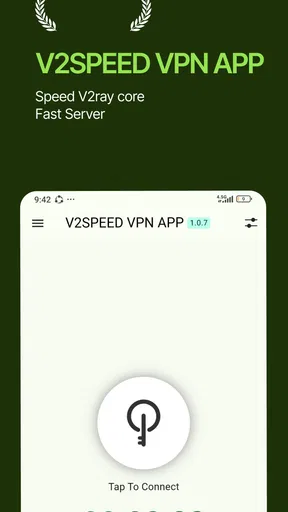
After installing the app, take a moment to look at its main screen before connecting. A clean layout can help a new user find the central action, but it is still worth reading any Android connection prompt carefully. VPN apps need the operating system’s approval to create a VPN connection; that prompt is part of the setup, not proof by itself that every privacy claim has been independently verified.
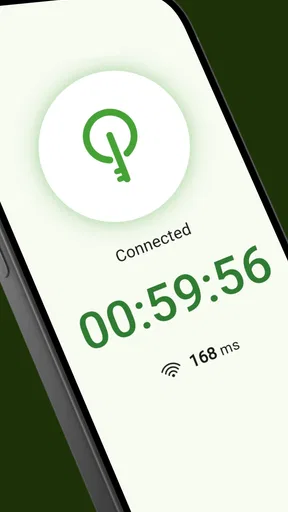
For a first run, keep the goal modest: connect, wait for the app and Android to show that the VPN is active, then open a familiar site. This gives you a useful baseline without mixing in several unknowns at once. If the connection does not start, check whether another VPN is already active, whether your network is working normally, and whether the app has been allowed to establish its connection.
A sensible first use
Imagine arriving at a café and needing to check a booking on public Wi-Fi. I would connect before opening the booking page, confirm that the VPN remains active, and avoid entering sensitive details if the connection drops or behaves strangely. The VPN can add a layer of protection to the network route, but it does not make a fake sign-in page safe; checking the address and using a trusted app or saved bookmark still matter.
Worth Reading Before You Choose

EA SPORTS FC Mobile 26 Is a Bigger Football Game, but It Takes Time

Flipboard Shows What News Apps Must Do Beyond the Feed

Switching to Android Auto Means Rethinking Your Driving Routine

Google Calendar Makes a Crowded Week Easier to Manage

Ludo King Makes the Most of the Minutes Between Plans

Baby Panda World Brings Quick Play to Modern Phones, but Its Game Library Feels Busy
For routine browsing at home, the decision is less automatic. A VPN may be useful if you want traffic routed through a VPN service, but it can also introduce an extra step or affect speed. I would compare the experience with and without it for the tasks that matter, rather than leave it on by habit without knowing what changes.
Where a first-time user should pause
VPNs are not interchangeable, and a simple interface should not be mistaken for a complete privacy audit. Before relying on this app for work accounts, financial activity or sensitive communications, I would read its current privacy and service terms and decide whether they meet my needs. If your priority is independently documented security practices, detailed controls or a particular business requirement, a VPN that clearly provides those things may be a better fit.
It is also worth checking what happens when the VPN disconnects. A VPN connection can end because of network changes or an app interruption, so do not assume it is still active just because you turned it on earlier. For a sensitive task, verify the connection at the time you need it; for ordinary browsing, reconnecting when necessary may be enough.
The best first success is a connection you can verify and understand. Start with one ordinary task, notice whether the app stays connected, and decide whether the added routing is worth any change in speed or convenience. That gives you a more useful basis for choosing than a broad promise about being fast or secure.
Getting Started with V2SPEED VPN
First off, getting V2SPEED VPN set up on your device is a breeze. Whether you’re using Android or iOS, the app is available on both platforms, and the download process is as smooth as butter. Just head over to the app store, tap that install button, and you’re halfway to a safer internet experience.
Once installed, you’re greeted with a clean and intuitive interface. No fancy jargon or unnecessary clutter, just straight to the point. I appreciate apps that don’t mess around, and V2SPEED VPN delivers that crisp user experience.
The Speed Factor
Now, I know what you're thinking—speed. Does this VPN actually live up to its name? In my experience, absolutely. I tested it across multiple servers, and the speed was consistently impressive. Whether I was streaming videos or just browsing, there was barely a hiccup.
What’s cool is that it automatically selects the best server for you, ensuring that you’re always browsing at optimal speed. And if you’re feeling adventurous, you can manually switch servers to explore different regions. It’s like having a world tour at your fingertips!
Security and Privacy
Let’s talk about security, because that's a big deal when it comes to VPNs. V2SPEED VPN uses top-notch encryption to keep your data safe from prying eyes. The app doesn’t just promise security; it delivers it. I felt confident knowing my online activity was protected.
Plus, there’s a strict no-logs policy, which means your data isn’t being stored or sold. In today’s digital age, that’s a feature that can’t be overlooked. It’s like having a personal bodyguard for your internet connection.
User Experience
One thing that stands out to me is the app’s simplicity. It's not just about the clean interface; it’s about how everything is laid out. Whether you’re an experienced VPN user or a complete newbie, navigating through the app is a walk in the park.
Another nifty feature is the ability to connect up to five devices simultaneously. So, if you’ve got a phone, tablet, laptop, and maybe a smart fridge (hey, we’re living in the future), you’re covered. It’s convenient and makes the app versatile for all your devices.
Next steps and who it suits
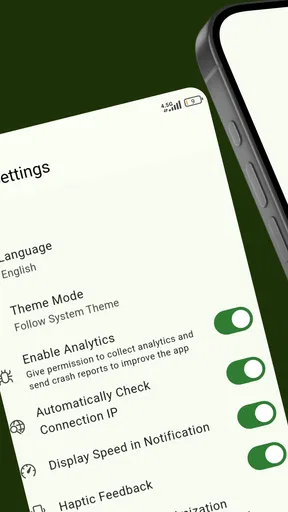
Once the first connection works, I would use the server selector deliberately instead of treating the automatic choice as universally best. For a nearby website or a video call, a closer route is usually the sensible starting point; for a site that behaves differently by region, a manual choice may be worth testing. Change one thing at a time, then retry the same page. That makes it easier to tell whether a new server helped or whether the network itself changed.
That small comparison is especially helpful when streaming. A VPN can alter how a service sees your connection, and a streaming platform may still restrict content based on its own rules. I would not choose this app on the assumption that it guarantees access to a particular catalogue. If watching one specific service is the main reason you want a VPN, look for clear compatibility information from the service and the VPN provider before relying on it.
For a first-time user who mainly wants a simple on/off routine, the uncomplicated presentation is a genuine advantage. You do not need to learn a long list of networking terms to try a connection and see how everyday browsing feels. If you only need occasional protection on shared Wi-Fi, a quick check before opening a session can make the tool easy to fit into your routine.
On the other hand, I would skip it if you need a VPN for a managed workplace, a specific compliance obligation, or fine-grained network controls. In those cases, ask the organization’s IT team which service and settings are approved. A consumer VPN may not match those requirements, even if its basic connection is easy to use.
How it compares with familiar alternatives
Compared with browsing without a VPN, the main trade-off is an additional service between your device and the sites you visit. That can be useful on networks you do not control, but it also means you are placing trust in the VPN provider and accepting the possibility of slower connections. A VPN is not automatically better for every session; I would turn it on when its routing benefit matters and keep an eye on whether it interferes with what I am doing.
Compared with a more advanced VPN app, a simpler tool can feel less intimidating, but experienced users may prefer clear access to detailed connection settings, diagnostic information or documented privacy practices. I would not assume that a minimal interface offers those controls. If you need to investigate connection behavior or meet a strict privacy standard, choose a service whose documentation and controls answer those needs plainly.
There is also a difference between a VPN and a private browsing window. Private browsing mainly limits what is saved locally in that browser session; it does not provide the same VPN routing. Conversely, a VPN does not erase cookies already stored in a browser or stop every form of online tracking. I find it useful to choose the tool for the job rather than expecting one setting to handle both.
Making the routine reliable
A practical habit is to check the connection indicator after switching between Wi-Fi and mobile data, because a network change can interrupt an active VPN session. If an app or site stops loading, first see whether the VPN is still connected; then try a different server or briefly disconnect to identify whether the issue is related to the route. Avoid entering private information while troubleshooting on an untrusted network.
If you share a device with family, explain what the VPN does in plain language and show them how to tell whether it is connected. That is more useful than leaving them with the impression that every online action is now protected. For a household that needs consistent coverage across multiple devices, check the actual device and account arrangements before planning around simultaneous use.
The app is free, which makes trying a basic connection less of a financial commitment, but price alone should not settle a privacy decision. I would still review the current terms and think about what kind of activity I am comfortable routing through the service. The current version is 1.1.5, and the app was released on November 15, 2024; when evaluating any VPN, I would also keep it updated through the relevant app store so I am using the available release.
Final Thoughts
All in all, V2SPEED VPN ticks all the right boxes for me. It offers incredible speed, robust security features, and a user-friendly experience. If you’re on the hunt for a reliable VPN that won't let you down, this app is definitely worth a shot.
Whether you’re streaming, surfing, or just plain browsing, knowing you’re doing it safely and quickly is a game-changer. So go ahead, give V2SPEED VPN a try, and see for yourself why it’s making waves in the VPN world. You might just find it’s exactly what you’ve been looking for.
My recommendation is to treat the first session as a small, practical test rather than a commitment: connect before a low-stakes browsing task, confirm the connection, and notice whether pages respond as expected. If that experience suits you, keep the same simple routine for situations where a VPN is useful. If your priority is documented privacy guarantees, advanced controls or a specific service compatibility requirement, compare alternatives carefully before depending on it.
Pros
- Fast connection speeds.
- User-friendly interface.
- Supports multiple devices.
- No data logging policy.
- Global server coverage.
Cons
- Limited free version.
- Occasional connection drops.
- Ads in free version.
- No dedicated IP option.
- Customer support is basic.
FAQs for V2SPEED VPN
What is V2SPEED VPN used for?
V2SPEED VPN is a virtual private network application designed to provide secure and private internet access. It encrypts your data, protecting your online activities from hackers and trackers. It's ideal for users who want to access geo-restricted content, enhance security on public Wi-Fi, or maintain privacy while browsing.
How does V2SPEED VPN ensure my privacy?
V2SPEED VPN employs advanced encryption protocols to secure your data. It masks your IP address, making your online activities anonymous. The app also follows a strict no-logs policy, ensuring that your browsing history and personal information are not recorded or stored.
Is V2SPEED VPN easy to use for beginners?
Yes, V2SPEED VPN is designed with a user-friendly interface that caters to both beginners and experienced users. The setup process is straightforward, and with just a few taps, users can connect to the VPN. Additionally, the app provides guidance and customer support to assist new users.
Can I use V2SPEED VPN on multiple devices?
V2SPEED VPN supports multiple device connections, allowing users to secure all their devices under one account. Whether you use Android, iOS, or a combination of both, you can enjoy the VPN’s features across your phone, tablet, and other compatible devices.
Does V2SPEED VPN affect internet speed?
While using any VPN can slightly affect internet speed due to the encryption process, V2SPEED VPN is optimized to minimize speed loss. It offers high-speed servers that ensure fast and stable connections, allowing users to stream, browse, and download with minimal disruption.


